Accommodation Services
Living in the dormitories means you don't have to carry your whole house with you. The university provides several practical services to make your daily life easier.
Washing Machine
On some floors, there are rooms just with a washing machine which you can use. Just go to the reception, ask for the “pračka” and you will get the key.
Cost: 60 CZK / 3 hours
Clothes Dryer
Need to dry your clothes? You can borrow a small clothes dryer (“sušák”) to your room for max 48 hours. If none are available, you can use a special drying room (“sušárna”). If you return the key late, you have to pay a penalty!
Deposit: 50 CZK
Bedclothes
After your arrival, you will get bedclothes from the dormitories. If you need to change them for clean ones, you can do it in the repository (“sklad”) in the basement of the K1 dorms. Just check the opening hours.
Other Facilities
There are many other facilities you can use, like a vacuum cleaner, a lamp, light bulbs, or an iron. It’s also possible to use the common room, a room with ping-pong, table football, TV, or a piano. It just depends on what you need!
Internet Connection (Eduroam)
Cable connections are not used much on college anymore. Use the WIFI eduroam network with your login credentials. This guide will help you set up the connection in your dormitory room.
Get your login credentials
You need to be an active student. Your faculty coordinator has to create an account for you and send you back your login credentials.
eduID username: (ie. stxxxx)
password: (ie. x95123456AB)
⚠️ If you don't have your login credentials or Multi-factor authentification (MFA) yet, please report it to your Buddy so they can help you!
Set your eduroam password
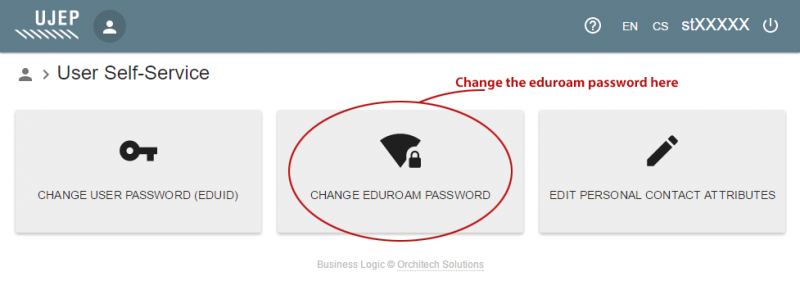
Go to id.ujep.cz, use your eduID to login (stxxxx). You must change your eduroam password - it's empty by default.
Note: Do not change the eduID password!
Login to the network
Connect to the eduroam Wi-Fi ussing application geteduroam.org. In the aplication search for UJEP and enter login credentials.
User: stxxxxx
Pass: your newly created eduroam password